

Why Polymarket.co.za Is the Smart Choice for Durban July 2026
Step-by-Step: How to Deposit on Polymarket.co.za (South Africa)
Step 1: Sign Up / Log In
- Go to polymarket.co.za
- Click Sign Up (or Log In if you already have an account)
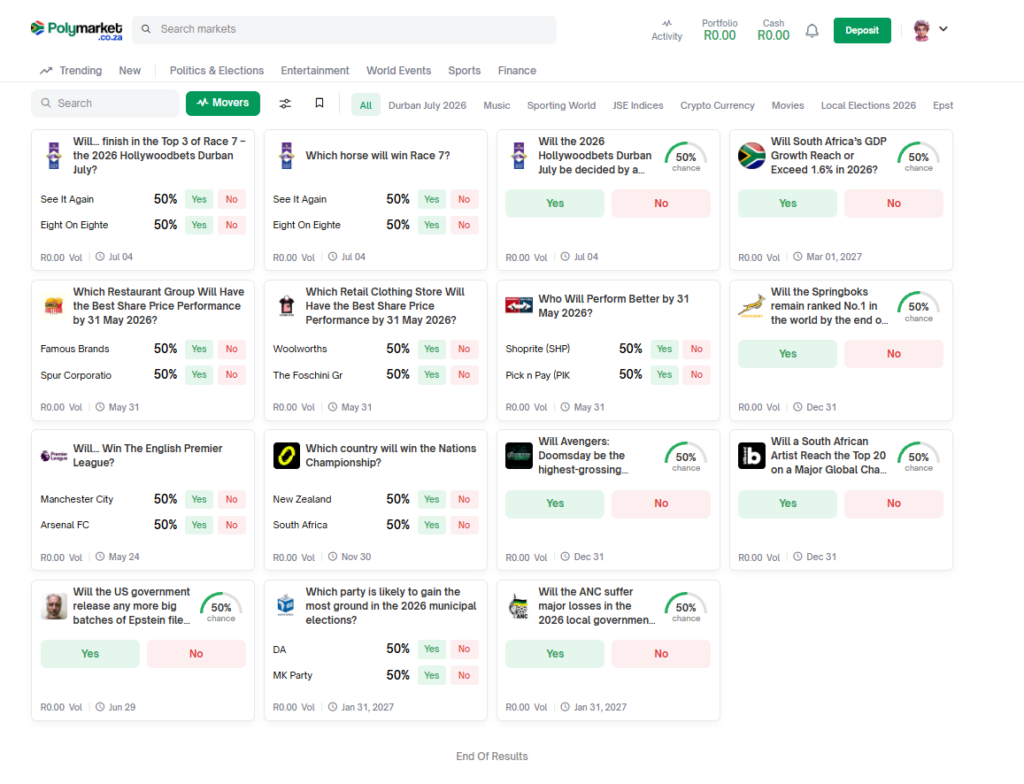
- Click the Deposit button (top right, next to your profile)
- Choose your preferred method:
- Fastest for SA users: Local bank transfer / Ozow / PayFast (ZAR → instant)
- Crypto transfer.
- Follow the on-screen instructions
- Minimum deposit is usually very low (often R100–R200 equivalent)
Pro tip: First-time users often receive a small welcome bonus or reduced fees — check the deposit screen for any current promotions.
- ZAR methods usually credit in 30 seconds to 5 minutes.
- Crypto transfers take 1–10 minutes.
- Refresh the page if the balance doesn’t show immediately.
Step 4: Your First Durban July Trade (Live Example)Once funded:
- Search for the “Durban July” in the search bar
- Open the Winner Market, Photo Finish, or Top 3 market
- Click Yes or No on your chosen outcome
- Enter the Rand amount you want to trade
- Confirm the trade
Quick Start Tips for Durban July 2026 Traders
- Start small (R200–R500) on your first 3–5 trades to learn the interface.
- The Photo Finish market is the easiest for beginners and often has great value. Read our article covering the Photo Finish market on polymarket.co.za.
- Keep 30–40% of your bankroll in cash for price dips after declarations or barrier draw.
- Set price alerts in the app for your favourite horses.
Troubleshooting Common Deposit Issues
- Balance not showing? Refresh the page or log out and back in.
- Payment declined? Try a different ZAR method or smaller amount first.
- Crypto deposit delayed? Check the transaction on your crypto wallet.
- Still stuck? Use the live chat support on Polymarket.co.za — they are very responsive for SA users.
How Polymarket Deposits Compare to Hollywoodbets
Common Questions New Traders Ask
- How do I deposit money on Polymarket.co.za?
You can deposit instantly using EFT, Ozow, credit/debit card, or instant bank transfer. Go to your wallet, select “Deposit”, choose your method, and follow the prompts. Most deposits appear within minutes.
- What is the minimum deposit amount on Polymarket for Durban July trading?
The minimum deposit is R50. You can start trading with a small bankroll and scale up as you become comfortable.
- How long does it take for a deposit to appear in my Polymarket account?
EFT and Ozow deposits usually reflect instantly or within 5–15 minutes. Card deposits are immediate. Bank transfers may take up to 30 minutes.
- Can I start trading Durban July 2026 markets right after depositing?
Yes! Once your deposit shows in your wallet, you can immediately place trades on the main Win, Place, Top 5, and Photo Finish markets.
- What payment methods are available for South African users on Polymarket.co.za?
Polymarket supports EFT, Ozow, Visa/Mastercard, and major South African banks. All methods are ZAR-based with no currency conversion fees.
- Is there a deposit bonus or promo for new Polymarket traders in 2026?
Polymarket occasionally runs deposit match promotions for Durban July season. Check the promotions page after registering or contact support for current offers.